

In modern software engineering, few tools are as foundational, and as misunderstood, as Git and GitHub for DevOps. Many beginners see them as just “code storage platforms.” Professionals know better. They form the backbone of modern collaboration, release management, automation, and continuous delivery.
If you are preparing for a DevOps career, transitioning from development, or trying to understand how version control integrates into CI/CD pipelines, this guide will give you a structured, practical understanding, not surface-level definitions.
We will go beyond commands and dashboards. You will understand how Git version control, GitHub workflows, and distributed collaboration models shape DevOps in 2026, and how to use them effectively in real-world environments.
01. Understanding Version Control in DevOps
Before discussing platforms and commands, it’s essential to understand what version control truly means in the DevOps lifecycle.
Version control is the practice of tracking and managing changes to code over time. But in DevOps, it extends beyond source code. Infrastructure definitions, Kubernetes manifests, CI/CD configurations, Dockerfiles, and documentation, all are versioned.
When teams adopt Git properly, they achieve:
- Traceability of changes
- Safe collaboration across distributed teams
- Controlled release management
- Auditability and rollback capability
- Foundation for automation
In DevOps, Git becomes the single source of truth.
Without version control discipline, continuous integration and continuous deployment simply cannot function reliably.
02. What Is Git? The Core of Modern Version Control
At its heart, Git version control is a distributed version control system. Unlike older centralized systems, every developer maintains a full copy of the repository, including complete history.
This distributed model provides:
- Offline commits
- Faster operations
- Flexible branching
- Reduced single points of failure
The Distributed Advantage
In a centralised system, losing the central server could mean losing history. With Git, every clone is a backup. In DevOps environments, where reliability is paramount, this architecture matters.
Key Git Concepts Explained Clearly
To use Git effectively in DevOps workflows, you must understand these core concepts:
- Repository: A project directory tracked by Git.
- Commit: A snapshot of changes at a given time.
- Branch: An independent line of development.
- Merge: Combining changes from different branches.
- Rebase: Rewriting commit history for cleaner integration.
- HEAD: Pointer to the current working branch.
These are not just theoretical terms. They directly influence how teams design release strategies and manage production stability.
Placement Clients


MSME Companies in UK & US
03. What Is GitHub? Beyond Code Hosting
Many assume GitHub is Git. It is not.
Git is the version control engine. GitHub is a collaboration platform built around Git repositories.
GitHub provides:
- Remote repository hosting
- Pull request workflows
- Code review systems
- Issue tracking
- Project boards
- Integrated CI/CD pipelines
- Access management
- Security scanning
For DevOps professionals, GitHub becomes more than storage; it becomes workflow orchestration.
In 2026, platforms like GitHub are increasingly integrating automation, AI-based code review suggestions, and infrastructure validation tools, making them central to DevOps automation.
04. How Git & GitHub Power DevOps Workflows
To understand GitHub for DevOps, you must see how it connects to the broader lifecycle.
1. Code Collaboration
Developers create feature branches, commit changes, and push to remote repositories. Pull requests initiate reviews.
This ensures:
- Peer validation
- Code quality improvement
- Structured merging
2. CI/CD Integration
Modern DevOps pipelines automatically trigger on Git events:
- Push to main branch → Build starts
- Pull request created → Tests execute
- Tag created → Production deployment triggered
Git becomes the event source for automation.
3. Infrastructure as Code (IaC)
Tools like Terraform and Kubernetes use declarative configuration files stored in Git repositories.
When infrastructure definitions change, pipelines apply those updates automatically.
This model is known as GitOps, where Git acts as the source of truth for both applications and infrastructure.
05. Branching Strategies in DevOps
Branching is where many beginners struggle.
Using Git without a branching strategy leads to chaos.
Common Branching Models
- Git Flow: Structured model with separate branches for development, release, and hotfixes.
- Trunk-Based Development: Developers commit frequently to a single main branch with short-lived feature branches.
- Feature Branch Workflow: Each feature was developed in isolation and merged after review.
Which Strategy Is Best?
In 2026, many DevOps teams prefer trunk-based development for faster delivery and reduced merge conflicts.
However, enterprise environments with strict compliance requirements may still use structured Git Flow.
The decision depends on:
- Team size
- Deployment frequency
- Risk tolerance
- Compliance requirements
Recent Job Descriptions

06. Pull Requests and Code Reviews: Quality Control in Action
Pull requests are not just approval buttons. They are structured collaboration tools.
They allow teams to:
- Discuss changes line by line
- Suggest improvements
- Run automated tests
- Enforce approval policies
- Maintain clean commit history
From a DevOps perspective, pull requests integrate with CI/CD pipelines to ensure:
- Builds pass
- Security checks complete
- Dependencies are validated
- Infrastructure changes are reviewed
This reduces production failures significantly.
07. GitHub Actions and CI/CD Automation
One of the major evolutions in GitHub for DevOps has been built-in automation through GitHub Actions.
GitHub Actions enables:
- Automated testing
- Container builds
- Docker image publishing
- Infrastructure deployment
- Release tagging
- Security scanning
All configured via YAML files stored inside the repository.
This reinforces a core DevOps principle:
Everything is versioned. Everything is automated.
Automation defined in Git is reproducible, auditable, and scalable.
08. GitOps: The 2026 Standard for Infrastructure Management
GitOps is not a buzzword. It is a practical extension of DevOps.
Under GitOps:
- Git repository = Desired state
- Deployment tools monitor Git
- Changes in Git automatically update infrastructure
This model improves:
- Audit trails
- Rollback capability
- Change visibility
- Compliance documentation
When infrastructure drift occurs, Git remains the authoritative reference.
This approach is increasingly adopted in Kubernetes-based environments.
09. Common Misconceptions About Git & GitHub
Let’s address practical misunderstandings.
“Git Is Only for Developers”
False.
DevOps engineers, SREs, cloud architects, and even security teams rely on Git to manage infrastructure and automation workflows.
“GitHub Is Just a Storage Platform”
Incorrect.
GitHub orchestrates collaboration, automation, security scanning, and project tracking.
“Version Control Is Easy to Learn, So Depth Doesn’t Matter”
Superficial Git knowledge leads to:
- Poor branching
- Messy history
- Merge conflicts
- Deployment failures
Understanding commit hygiene, rebasing strategies, and clean history maintenance directly impacts production reliability.
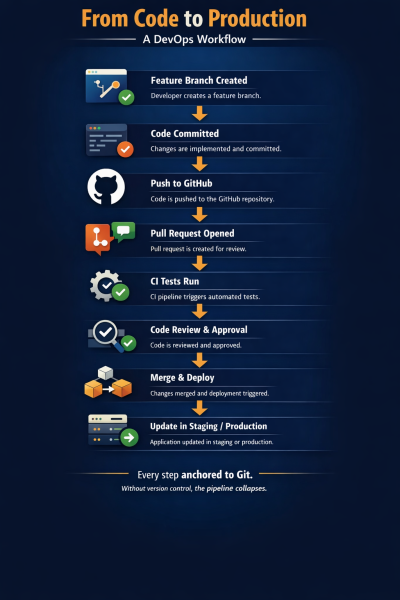
10. Practical Workflow: From Code to Production
Let’s examine a simplified real-world flow:
11. Security and Access Control in GitHub
In enterprise DevOps environments, security cannot be ignored.
GitHub provides:
- Role-based access control
- Branch protection rules
- Required reviews before merge
- Secret management
- Code scanning alerts
- Dependency vulnerability scanning
In 2026, security automation within version control platforms is increasingly mandatory due to compliance regulations.
DevOps professionals must understand:
- How to restrict direct pushes
- How to enforce signed commits
- How to protect production branches
- How to audit repository access
Security and version control are now deeply integrated.
12. Git & GitHub in Career Development
For beginners and career switchers, Git skills are often underestimated.
Recruiters and hiring managers expect:
- Confident branching
- Pull request workflow knowledge
- CI/CD integration understanding
- Ability to resolve merge conflicts
- Clean commit practices
In DevOps interviews, you may be asked:
- Explain the difference between merge and rebase.
- How would you handle a broken production deployment?
- What is GitOps?
- How do you prevent direct pushes to main?
Knowing commands is not enough. Understanding workflow implications is critical.
13. Comparing GitHub with Other Platforms
While GitHub dominates, alternatives exist:
- GitLab
- Bitbucket
- Azure Repos
The core Git engine remains the same.
The difference lies in:
- Built-in CI/CD capabilities
- Enterprise compliance tools
- Integration ecosystems
- Pricing models
For most learners, GitHub offers a strong starting point due to its ecosystem, community visibility, and integration depth.
However, DevOps engineers should be comfortable adapting to platform variations.
14. Decision Support: When and Why You Must Master Git
If you are:
A beginner entering software development
A working professional moving into DevOps
A cloud engineer managing infrastructure
A freelancer collaborating with teams
Then mastering Git and GitHub for DevOps is not optional.
It becomes mandatory when:
- You work in teams
- You automate deployments
- You manage production systems
- You implement CI/CD
- You adopt Infrastructure as Code
Without version control fluency, scaling DevOps practices becomes nearly impossible.
15. Learning Path for Git & GitHub in DevOps
A structured learning path should include:
First, understanding local Git operations deeply.
Second, mastering branching and conflict resolution.
Third, working with pull requests and code reviews.
Fourth, integrating CI/CD pipelines.
Fifth, implementing GitOps workflows.
Finally, applying security best practices.
Practical implementation is essential. Reading alone does not build confidence.
16. From Git Basics to Production-Ready DevOps
Many learners stop at “git add, commit, push.”
Professional growth begins when you:
Understand commit atomicity
Write meaningful commit messages
Maintain a clean history
Use rebase strategically
Implement protected branches
Design CI pipelines triggered by Git events
If your goal is to build production-ready DevOps skills, including automation, cloud deployment, and AI-assisted workflow optimization, then Git mastery must sit at the core of your skillset.
For those looking to move beyond theory and build practical capability across Git, CI/CD, Infrastructure as Code, and automation, structured programs such as the DevOps With Gen AI pathway can provide guided implementation experience aligned with real-world industry requirements.
The key is not just learning tools, but understanding how they connect within a DevOps ecosystem.
17. The Future of Git & GitHub in 2026 and Beyond
In 2026, version control platforms are evolving toward:
- AI-assisted pull request reviews
- Automated security remediation
- Infrastructure drift detection
- Intelligent merge conflict resolution
- Policy-as-code enforcement
However, foundational Git principles remain unchanged.
Technology evolves. Core version control discipline does not.
Those who understand fundamentals adapt faster to platform innovation.
18. Conclusion: Version Control Is the Backbone of DevOps
Git is not just a tool. GitHub is not just a hosting platform.
Together, Git & GitHub for DevOps form the structural backbone of modern software delivery.
- They enable collaboration.
- They power automation.
- They support security.
- They enable rollback.
- They drive CI/CD.
- They make GitOps possible.
For beginners, the journey starts with understanding commits and branches.
For professionals, mastery means designing reliable workflows, enforcing discipline, and integrating automation intelligently.
In DevOps, everything begins, and often ends, with version control.
If you want to build a sustainable career in cloud, automation, and modern infrastructure management, mastering Git is not an optional skill.
It is the foundation upon which everything else stands.
Navigate to Address
Scoop Labs
59, 2nd Floor, VLM Towers, 10th Cross Road, 2nd Stage, Padmanabha Nagar, Banashankari, Bengaluru, Karnataka 560070
Get Direction: Banashankari
Submit a Request
Recent Posts


