

01. Overview
If you have worked with Docker containers, you already understand how applications can be packaged with their runtime, dependencies, and configurations into portable units. However, when applications need to run reliably across hundreds or thousands of servers, managing individual containers quickly becomes impractical. This is where Kubernetes enters the picture. Kubernetes automates container deployment, scaling, networking, and recovery, making it the standard orchestration platform for cloud-native applications. At the heart of Kubernetes lies its smallest deployable unit—the Pod.
Many beginners assume that Pods are simply another name for containers. In reality, a Pod is a higher-level abstraction that manages one or more tightly coupled containers as a single unit. Every application deployed in Kubernetes runs inside a Pod, not directly as a standalone container. Understanding this distinction is essential because nearly every Kubernetes object—including Deployments, StatefulSets, Jobs, DaemonSets, and ReplicaSets—ultimately manages Pods rather than containers themselves.
Whether you are deploying web applications, APIs, microservices, machine learning workloads, or enterprise software, Pods provide the execution environment where applications actually run. For software developers transitioning into cloud-native development, learning how Pods work bridges the gap between writing containerized applications and deploying them at production scale. For professionals focused on Upskilling and improving Job Readiness, mastering Kubernetes Pods is a fundamental step toward understanding modern DevOps and cloud engineering practices.
02. What Is a Kubernetes Pod?
A Pod is the smallest deployable object in Kubernetes that encapsulates one or more containers running together on the same worker node.
Containers inside a Pod share:
- Network namespace
- IP address
- Port space
- Shared storage volumes
- Lifecycle
- Scheduling decisions
Instead of managing individual containers, Kubernetes schedules and manages Pods.
Even if a Pod contains only one container, Kubernetes still treats the Pod as the deployable unit.
Placement Clients


MSME Companies in UK & US
03. Why Does Kubernetes Use Pods Instead of Managing Containers Directly?
Kubernetes introduces Pods because many application components need to work together as a single logical unit.
Using Pods provides several advantages:
- Simplified container management
- Shared networking
- Shared storage
- Coordinated lifecycle management
- Easier scaling
- Better application organization
This abstraction enables Kubernetes to manage applications consistently regardless of the underlying container runtime.
04. How Does a Pod Fit into Kubernetes Architecture?
Pods exist within a larger Kubernetes ecosystem.
A simplified deployment workflow includes:
- Developer creates deployment configuration.
- Kubernetes creates Pods.
- Scheduler assigns Pods to worker nodes.
- Containers start inside Pods.
- Services expose applications.
- Users access the application.
Pods act as the execution layer between Kubernetes controllers and application containers.
05. Kubernetes Pod Deployment Workflow
Recent Job Descriptions

06. What Does a Pod Contain?
Although developers often associate Pods with containers, a Pod includes several important components.
Application Containers
A Pod usually contains one primary application container.
Examples include:
- Web applications
- REST APIs
- Backend services
- Worker processes
This container performs the application's primary function.
Shared Network
Every container inside a Pod shares the same IP address and network namespace.
This allows containers within the same Pod to communicate using localhost, eliminating the need for external networking.
Shared Storage
Pods can mount shared volumes that all containers access simultaneously.
Common use cases include:
- Configuration files
- Temporary storage
- Shared application data
- Log exchange
Metadata
Each Pod contains metadata such as:
- Name
- Labels
- Namespace
- Annotations
Metadata enables Kubernetes to organize, monitor, and manage Pods efficiently.
07. Can a Pod Contain Multiple Containers?
Yes. Although many Pods contain only one application container, Kubernetes also supports multiple tightly coupled containers inside the same Pod.
Common multi-container patterns include:
Sidecar Container
Provides supporting functionality such as:
- Log collection
- Monitoring
- Proxy services
- Security agents
Ambassador Container
Handles communication with external systems.
Examples include:
- Database proxies
- API gateways
- Service communication adapters
Adapter Container
Transforms data before it reaches the primary application.
These patterns improve modularity while allowing related containers to share resources efficiently.
08. How Do Pods Communicate?
Pod communication depends on whether applications are inside the same Pod or different Pods.
Within the Same Pod
Containers communicate using:
- Localhost
- Shared network
- Shared ports
Communication is extremely fast because all containers share one network namespace.
Between Different Pods
Pods communicate through Kubernetes networking.
Each Pod receives:
- Unique IP address
- Cluster-wide accessibility
- Network routing managed by Kubernetes
Services provide stable access even if Pods are recreated.
09. What Happens When a Pod Fails?
Pods are designed to be temporary rather than permanent.
If a Pod crashes:
- Kubernetes detects the failure.
- A replacement Pod is created.
- Scheduling occurs automatically.
- Traffic is redirected to healthy Pods.
Controllers such as Deployments ensure the desired number of Pods always remain available.
10. Pod Lifecycle Overview
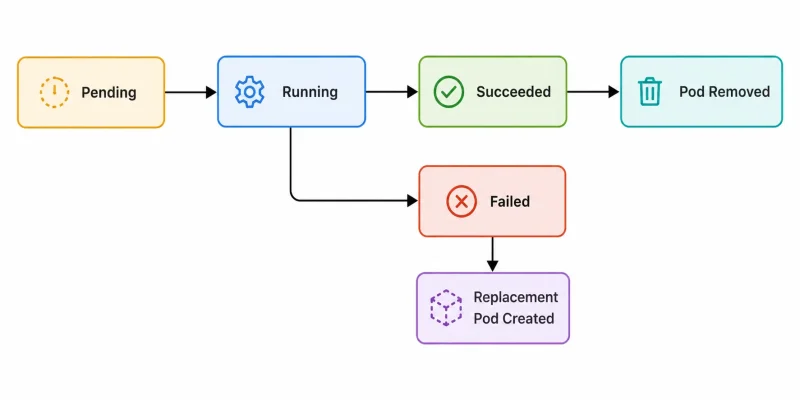 Understanding this lifecycle helps developers design resilient cloud-native applications.
11. How Are Pods Different from Containers?
Although closely related, Pods and containers serve different purposes.
FeatureContainerPodPurposeRuns an application processManages one or more containersNetworkingIndividual runtimeShared networkingStorageIndependent unless configuredShared volumes availableSchedulingNot directly scheduled by KubernetesScheduled by KubernetesLifecycleIndividual processManaged as one unit
Containers execute applications, while Pods provide the execution environment managed by Kubernetes.
12. What Common Mistakes Do Developers Make with Pods?
Developers new to Kubernetes often misunderstand how Pods behave.
Treating Pods as Permanent
Pods are replaceable resources and should not store critical persistent data locally.
Deploying Multiple Unrelated Applications Together
Only tightly coupled containers should share a Pod.
Ignoring Health Checks
Liveness and readiness probes help Kubernetes detect unhealthy Pods automatically.
Storing Persistent Data Inside Pods
Persistent application data should be stored using Kubernetes Persistent Volumes rather than the Pod's temporary filesystem.
Understanding these concepts leads to more reliable application deployments.
13. What Best Practices Improve Pod Management?
Organizations building production-ready Kubernetes applications typically follow several best practices.
Recommended approaches include:
- Keep Pods focused on a single application responsibility.
- Use sidecar containers only when necessary.
- Configure resource requests and limits.
- Implement readiness and liveness probes.
- Store persistent data outside Pods.
- Label Pods consistently for easier management.
- Monitor Pod health continuously.
These practices improve application reliability, scalability, and operational efficiency.
14. Why Should Cloud and DevOps Professionals Understand Kubernetes Pods?
Kubernetes has become the standard orchestration platform for containerized applications across cloud providers and enterprise environments. Since every Kubernetes workload ultimately runs inside Pods, understanding Pod architecture is fundamental to working with cloud-native systems.
Organizations involved in Technical Hiring frequently assess candidates on Kubernetes fundamentals, container orchestration, scaling strategies, and workload management during Interview Preparation. Demonstrating a strong understanding of Pods reflects practical knowledge of modern deployment architectures used in enterprise DevOps environments.
Developing expertise in Kubernetes also supports long-term Career Guidance, enabling professionals to contribute confidently to cloud infrastructure, microservices deployment, container orchestration, and enterprise platform engineering.
15. Conclusion
Pods are the foundational building blocks of Kubernetes, providing the environment where containerized applications actually run. By grouping one or more closely related containers into a single deployable unit, Pods simplify networking, storage sharing, lifecycle management, and orchestration across distributed systems. Understanding how Pods work enables developers to move beyond standalone containers and build scalable, resilient, and production-ready cloud-native applications.
For learners seeking practical Kubernetes and cloud experience, Placement Support, Placement Assistance, Resume Building, and industry-oriented DevOps training in Banashankari, Bangalore, Scoop Labs provides project-based learning designed to help students and professionals build real-world expertise in Kubernetes, Docker, Cloud Computing, and modern software engineering practices.
Navigate to Address
Scoop Labs
59, 2nd Floor, VLM Towers, 10th Cross Road, 2nd Stage, Padmanabha Nagar, Banashankari, Bengaluru, Karnataka 560070
Get Direction: Banashankari
Submit a Request
Recent Posts


