

01. Overview
Git is one of the most widely used version control systems in modern software development, enabling teams to collaborate efficiently while maintaining a complete history of every change made to a project. Most developers regularly use commands such as git add, git commit, git push, and git pull, but very few understand what Git actually stores behind the scenes. Every file, directory, and commit inside a Git repository is represented as a collection of objects, making Git far more than just a tool for tracking code changes.
At the core of Git's architecture are three fundamental object types: Blobs, Trees, and Commits. Together, these objects form the internal database that allows Git to reconstruct every version of a project with remarkable efficiency. Instead of storing complete copies of projects after every change, Git creates interconnected objects that reference one another, making repositories compact, reliable, and highly performant.
Understanding Git objects provides developers with deeper insight into how version control works, why Git operations are fast, and how repositories maintain data integrity. It also helps professionals troubleshoot repository issues, understand branching behavior, and appreciate advanced Git features such as rebasing, cherry-picking, and object recovery. For individuals focused on Upskilling and improving Job Readiness, learning Git internals offers practical knowledge that strengthens both software development and DevOps skills.
02. What Are Git Objects?
Git stores every piece of repository data as an object inside its internal object database.
Rather than saving complete project snapshots repeatedly, Git creates small reusable objects that reference one another.
The primary Git object types include:
- Blob
- Tree
- Commit
Together, these objects describe every version of a repository while minimizing storage requirements.
Placement Clients


MSME Companies in UK & US
03. Why Does Git Use Objects Instead of Traditional File Storage?
Traditional version control systems often duplicate complete files whenever changes occur.
Git follows a different approach by storing objects based on content rather than file names.
This design provides several advantages:
- Efficient storage utilization
- Faster repository operations
- Reliable version tracking
- Improved data integrity
- Easy branch management
- Rapid commit creation
Each object is identified using a unique cryptographic hash, ensuring that identical content is stored only once.
04. How Are Git Objects Created?
Whenever developers add files and create commits, Git automatically generates the required objects.
A simplified workflow includes:
- Create or modify files.
- Stage files.
- Generate Blob objects.
- Create Tree objects.
- Create Commit object.
- Update branch reference.
These objects become part of Git's internal database.
05. Git Object Creation Workflow
Recent Job Descriptions

06. What Is a Blob Object?
A Blob (Binary Large Object) stores the contents of an individual file.
Important characteristics include:
- Contains only file data
- Does not store file names
- Does not store directory structure
- Identified using a SHA hash
If two files contain identical content, Git stores only one Blob object regardless of their names or locations.
For example:
Document A:
Hello Git
Document B:
Hello Git
Both files reference the same Blob because their contents are identical.
This approach significantly reduces storage duplication.
07. What Is a Tree Object?
A Tree object represents the directory structure of a repository.
Instead of storing file contents, it records:
- File names
- Directory names
- Blob references
- Child Tree references
- File permissions
A Tree acts like a folder that organizes Blob objects into a meaningful project hierarchy.
Example:
Project
│
├── app.py
├── README.md
└── src
├── login.py
└── dashboard.py
The Tree object links every file and subdirectory without storing the actual file contents.
08. What Is a Commit Object?
A Commit object represents a snapshot of the repository at a specific point in time.
It stores important metadata including:
- Tree reference
- Parent commit
- Author information
- Commit message
- Timestamp
Rather than storing every project file again, the Commit simply references the Tree object that represents the repository state.
Each new commit points back to its parent, creating Git's complete project history.
09. How Are Blobs, Trees, and Commits Connected?
The three object types work together to represent repository history.
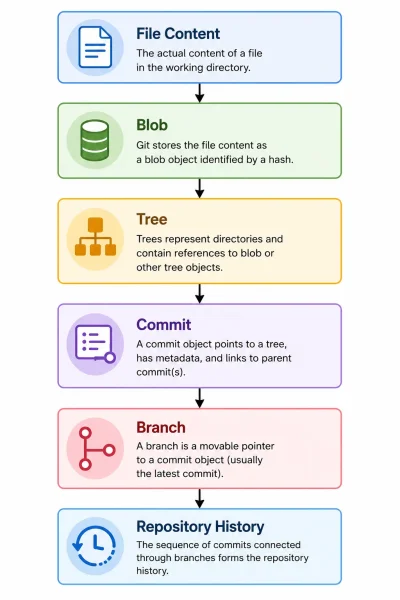 The relationship is straightforward:
- Blob stores file contents.
- Tree organizes files and folders.
- Commit records a repository snapshot.
- Branch references the latest commit.
This layered structure allows Git to reconstruct any historical version efficiently.
10. How Does Git Avoid Storing Duplicate Data?
Git identifies every object using a cryptographic hash generated from its contents.
If two objects contain identical data:
- Git computes the same hash.
- Only one object is stored.
- Multiple references point to the same object.
This process improves:
- Storage efficiency
- Repository performance
- Data consistency
It is one of the reasons Git repositories remain relatively compact even after years of development.
11. What Happens During a Commit?
Creating a commit involves several internal steps.
First, Git creates Blob objects for newly staged files.
Next, it generates Tree objects that represent the updated directory structure.
Finally, Git creates a Commit object containing:
- Repository snapshot
- Parent commit reference
- Author details
- Commit message
The branch pointer is then updated to reference the newly created commit.
Although these steps occur automatically, understanding them helps developers better appreciate Git's architecture.
12. Common Git Objects and Their Responsibilities
Git Object Stores Purpose Blob File Contents Represents individual file data Tree Directory Structure Organizes files and folders Commit Repository Snapshot Records project history Branch Reference Latest Commit Tracks active development
Each object plays a distinct role while contributing to Git's efficient version management system.
13. What Challenges Do Developers Face When Understanding Git Internals?
Git's internal architecture can initially appear complex because many operations occur automatically.
Common misconceptions include:
Assuming Commits Store Entire Projects
Commits reference Trees rather than storing complete project copies.
Confusing File Names with Blob Objects
Blob objects contain only content, not filenames.
Misunderstanding Directory Storage
Tree objects organize project structure instead of storing file data.
Ignoring Object Relationships
Understanding how objects reference one another simplifies concepts such as branching, merging, and history traversal.
Learning these relationships makes advanced Git workflows easier to understand.
14. What Best Practices Help Developers Work Effectively with Git?
Although Git manages objects automatically, developers can improve repository quality through good version control practices.
Recommended approaches include:
- Write meaningful commit messages.
- Keep commits focused on specific changes.
- Organize repositories with a logical folder structure.
- Review commit history regularly.
- Use feature branches for development.
- Avoid committing unnecessary generated files.
- Learn advanced Git commands alongside basic workflows.
These practices improve collaboration while maintaining a clean repository history.
15. Why Should Software Professionals Understand Git Objects?
Git is a fundamental tool across software development, DevOps, cloud engineering, and open-source collaboration. While everyday commands are sufficient for basic development, understanding Git internals provides deeper insight into repository behavior and version management.
Organizations involved in Technical Hiring often assess candidates on Git fundamentals, branching strategies, merge conflicts, and repository management during Interview Preparation. Demonstrating knowledge of Git objects shows an understanding of how version control systems work internally, reflecting stronger practical expertise.
Developing this knowledge also supports long-term Career Guidance, enabling professionals to work confidently with collaborative development workflows, CI/CD pipelines, and enterprise software projects.
16. Conclusion
Blobs, Trees, and Commits form the foundation of Git's powerful version control architecture. By separating file contents, directory structures, and repository history into interconnected objects, Git provides efficient storage, reliable tracking, and exceptional performance. Understanding these internal objects helps developers move beyond basic Git commands and gain a deeper appreciation of how repositories manage changes over time. This knowledge strengthens both everyday development practices and advanced version control skills.
For learners seeking practical software development experience, Placement Support, Placement Assistance, Resume Building, and industry-oriented technical training in Banashankari, Bangalore, Scoop Labs provides project-based learning designed to help students and professionals build real-world expertise in Git, DevOps, Cloud Computing, and modern software engineering practices.
Navigate to Address
Scoop Labs
59, 2nd Floor, VLM Towers, 10th Cross Road, 2nd Stage, Padmanabha Nagar, Banashankari, Bengaluru, Karnataka 560070
Get Direction: Banashankari
Submit a Request
Recent Posts


